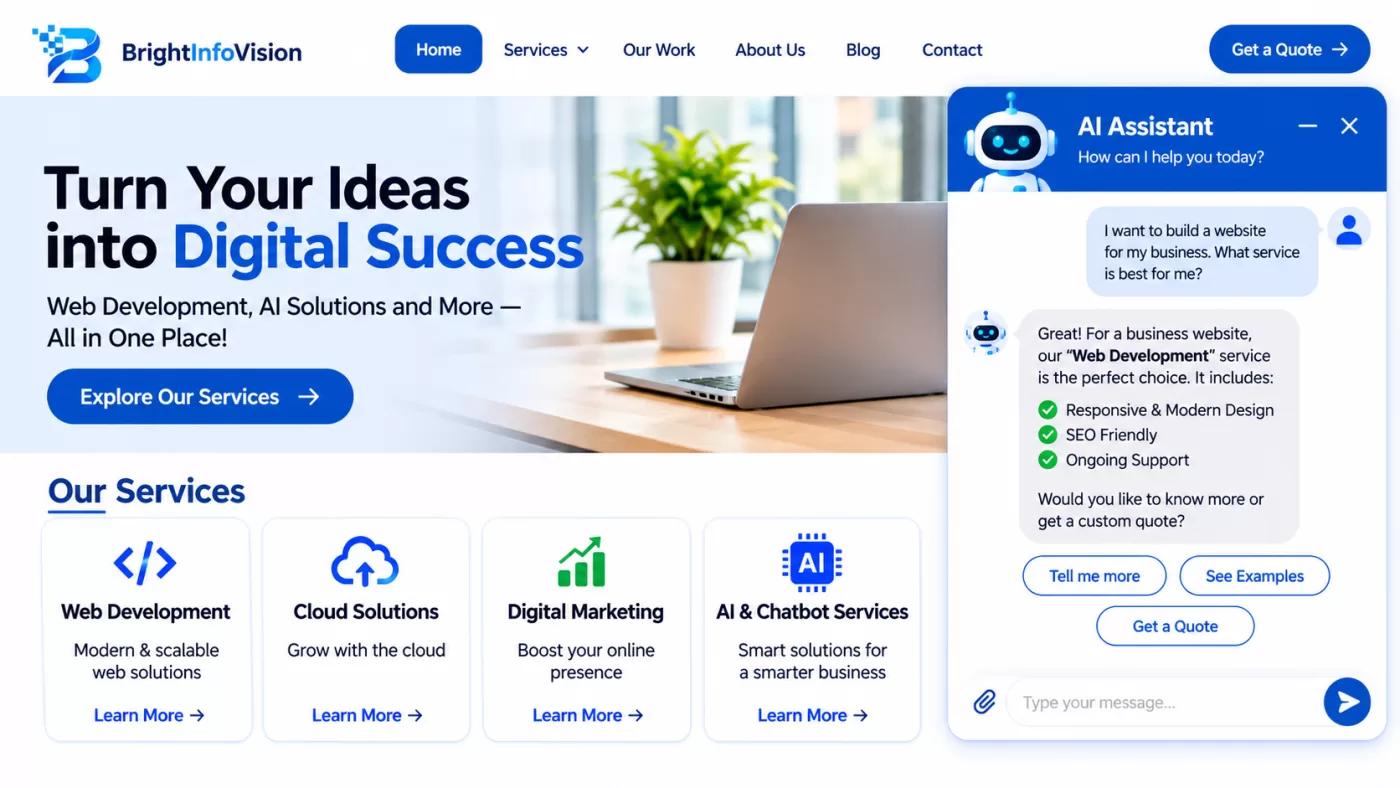
AI-native web development is the practice of designing websites with artificial intelligence built into the core user experience, content workflow, and business operations—not added later as a basic chatbot. In 2026, businesses can use AI to personalise journeys, answer common questions, qualify leads, support content operations, and make websites more useful without replacing human judgement.
For a business in Greater Noida or the wider NCR market, an AI-native website should do more than look modern. It should help visitors find relevant services, request a quote, book a consultation, or contact the right team quickly, while giving the business better visibility into what customers need. BrightInfoVision Technologies, a website design and development company based in Greater Noida, positions its services around website design, website development, and digital marketing for businesses seeking stronger online growth.
What Is AI-Native Web Development?
AI-native web development means AI is considered during planning, design, development, and ongoing optimisation—not merely attached to a finished website.
A traditional website presents information and collects enquiries. An AI-native website can understand context, assist users through conversational interfaces, recommend relevant content or services, automate repetitive tasks, and help teams maintain content more efficiently.
| Traditional website | AI-native website |
|---|---|
| Static service pages and contact forms | Context-aware service pages, guided enquiries, and conversational support |
| Generic content for every visitor | Relevant recommendations based on visitor intent and available first-party data |
| Manual content updates | AI-assisted drafting, editing, tagging, and content workflows with human approval |
| Basic chat widget | AI assistant trained on approved business information, FAQs, policies, and service details |
| Limited automation | Integrations with CRM, booking, email, analytics, and support systems |
The goal is not to make every website “AI-powered” for its own sake. The goal is to reduce friction for users and create measurable business value.
How Businesses Can Use AI
Businesses can use AI across several website functions, provided each use case solves a real customer or operational problem.
Customer support and self-service
An AI assistant can answer routine questions about services, locations, working hours, pricing ranges, documentation, or next steps. It should always disclose that it is an AI assistant and provide a clear route to a human when a query is complex, sensitive, or requires a decision.
For example, a Greater Noida-based service business can use an AI assistant to help visitors identify the right service, collect project requirements, and route qualified enquiries to the sales team.
Lead qualification and enquiry routing
AI can help classify enquiries by service interest, urgency, budget signals, location, and preferred contact method. This allows a business to send leads to the appropriate team faster while retaining a human review process.
Useful applications include:
-
Smart enquiry forms that ask follow-up questions based on earlier answers.
-
AI-assisted lead scoring based on defined business rules and CRM data.
-
Automatic routing of requests to sales, support, or technical teams.
-
Meeting or consultation booking directly from the website.
Personalised content and recommendations
AI can help surface relevant pages, products, case studies, articles, or service packages. For an eCommerce business, this may mean product recommendations. For a B2B service company, it may mean showing relevant services, resources, or industry examples based on the visitor’s stated needs.
Personalisation should be transparent and privacy-conscious. Businesses should avoid collecting unnecessary personal data and should provide clear choices around cookies, analytics, and marketing communications.
Content operations
AI can support content teams by suggesting outlines, improving clarity, creating alternate headings, summarising long documents, identifying FAQs, and helping maintain consistent brand tone. A human editor should still verify facts, claims, pricing, legal language, and customer-specific details before publishing.
Google states that AI-assisted and AI-generated content can be useful when it is helpful, reliable, and people-first; it also advises businesses to explain how automation was used where visitors would reasonably expect that information.developers.google
Internal search and knowledge discovery
AI-powered site search can understand natural-language questions such as “Do you build eCommerce websites?” or “Can you help with a website redesign?” and return relevant pages, services, FAQs, or resources.
This is especially valuable for businesses with large service catalogues, technical documentation, product ranges, or multiple locations.
Accessibility and usability improvements
AI can support accessibility through features such as alt-text suggestions, content readability checks, translation assistance, and voice-enabled navigation. These tools should assist—not replace—human accessibility review, because automated tools cannot fully evaluate every accessibility requirement.
Core Components of an AI-Native Website
A practical AI-native website combines strong fundamentals with carefully selected AI capabilities.
1. Clear website architecture
Start with a simple structure: home, services or products, about, resources, contact, and conversion pages. Each important page should answer a specific user question and guide visitors toward a relevant action.
For a web development company, useful pages may include website design, custom web development, eCommerce development, SEO and digital marketing, portfolio or case studies, and contact.
2. High-quality, people-first content
AI cannot compensate for unclear positioning or thin content. Every page should clearly explain:
-
What the business offers.
-
Who it serves.
-
What problem it solves.
-
Why a visitor should trust the business.
-
What the visitor should do next.
Google’s guidance emphasises helpful, reliable, people-first content and warns against creating content primarily to manipulate rankings. For AI search visibility, original expertise, practical examples, and non-commodity information matter more than repeating generic definitions.developers.google+2
3. Conversational AI with boundaries
An AI assistant should be scoped to approved business information. It should not invent prices, guarantees, availability, legal advice, medical advice, or claims about results.
A responsible setup includes:
-
A visible AI disclosure.
-
Links to service pages, contact details, and human support.
-
Clear escalation to a real person.
-
Regular review of unanswered or incorrect responses.
-
Restrictions on sharing sensitive customer information.
4. Structured data and technical SEO
Structured data helps search engines understand page content and can make pages eligible for certain rich results. Google notes that no special schema markup is required for AI features, but structured data remains useful when it accurately reflects visible page content and follows Google’s guidelines.developers.google+1
Relevant schema types may include Organization, LocalBusiness, Service, FAQPage, BreadcrumbList, and Article, depending on the page type.
5. Fast, secure, mobile-first performance
AI features should not slow down the website or compromise privacy. Use lightweight components, lazy-load non-critical scripts, compress images, implement HTTPS, and test performance on mobile networks.
Security should include secure coding practices, access controls, backups, malware monitoring, regular updates, and careful handling of customer data. NIST highlights that AI systems require attention to security, privacy, transparency, accountability, and reliability.
A Practical AI-Native Website Roadmap
Businesses do not need to launch every AI feature at once. A phased approach reduces risk and makes results easier to measure.
Phase 1: Audit and define goals
Review the current website’s traffic, enquiries, conversion paths, technical performance, content gaps, and customer questions. Identify the outcomes that matter most, such as more qualified leads, faster response times, lower support workload, or improved online sales.
Phase 2: Build the foundation
Before adding advanced AI, ensure the website has:
-
Clear service and product information.
-
Mobile-responsive design.
-
Fast loading pages.
-
HTTPS and basic security controls.
-
Accessible navigation and readable content.
-
Accurate business information and contact options.
-
Analytics and conversion tracking.
Phase 3: Add one high-value AI use case
Start with a controlled use case, such as an AI assistant for common service questions, an intelligent enquiry form, or AI-assisted content workflows. Define success metrics before launch, such as enquiry quality, response time, assisted conversions, or support-ticket reduction.
Phase 4: Integrate with business systems
Connect the website to tools the business already uses, such as a CRM, email platform, booking system, analytics platform, or customer-support system. This prevents AI from becoming an isolated feature with no operational value.
Phase 5: Measure, review, and improve
Review AI responses, content quality, privacy controls, conversion data, and user feedback regularly. AI systems need ongoing oversight because customer needs, products, services, and business information change over time.
AI Governance and Responsible Use
AI-native development should include governance from day one. Businesses should decide who approves AI-generated content, who reviews customer-facing responses, what data may be used, and how errors or complaints will be handled.
NIST’s generative AI profile recommends monitoring AI-generated content for privacy risks, including possible exposure of personally identifiable information or sensitive data. Its broader AI Risk Management Framework also identifies trustworthiness characteristics such as validity, safety, security, accountability, transparency, and explainability.airc.nist+1
A simple governance checklist:
-
Maintain an approved knowledge base for AI assistants.
-
Prohibit AI from making unsupported claims or commitments.
-
Require human approval for public-facing content.
-
Avoid uploading confidential customer data into AI tools without proper agreements.
-
Log key AI interactions for quality review, while respecting privacy obligations.
-
Provide an easy way for users to contact a human.
-
Review AI outputs for accuracy, bias, tone, and compliance.
Common Mistakes to Avoid
-
Adding a chatbot without training it on accurate, approved business information.
-
Using AI to mass-produce generic blog posts with little original value.
-
Collecting personal data without a clear purpose or consent approach.
-
Letting AI make pricing, delivery, legal, medical, or financial claims.
-
Ignoring website speed, accessibility, and mobile experience.
-
Measuring only chat volume instead of qualified leads, conversions, or customer satisfaction.
-
Treating AI as a replacement for strategy, design, editorial judgement, or customer service.
How BrightInfoVision Can Help
BrightInfoVision Technologies is a Greater Noida-based website designing and development company that offers website design, website development, and digital marketing services. Its website highlights more than 11 years of IT-industry experience, a focus on timely delivery, quality, and client satisfaction, and services for businesses both in Greater Noida and beyond.brightinfovision
For businesses considering AI-native web development, a suitable partner should be able to combine user-focused design, reliable development, SEO-friendly architecture, secure integrations, and a realistic AI implementation plan. The right approach is to begin with business goals, select AI features that solve measurable problems, and maintain human oversight throughout.
Frequently Asked Questions
What is AI-native web development?
AI-native web development is an approach where artificial intelligence is integrated into the website’s core experience and workflows. It can include AI assistants, intelligent search, personalised recommendations, automated lead routing, and AI-assisted content operations.
How can businesses use AI on their websites?
Businesses can use AI to answer common questions, qualify enquiries, recommend relevant services or products, improve site search, support content teams, automate routine tasks, and connect website activity with CRM and marketing systems.
Is AI-native web development suitable for small businesses?
Yes. Small businesses can begin with one focused use case, such as an AI assistant trained on service FAQs or a smart enquiry form. The key is to solve a specific customer problem rather than adding AI features without a clear purpose.
Does AI-generated content help SEO?
AI can assist with content production, but SEO performance depends on whether the content is helpful, accurate, original, and useful to people. Google advises that AI-assisted content should meet its Search Essentials and spam policies, and that automation should not be used primarily to manipulate rankings.developers.google
Do websites need special AI schema markup?
No. Google states that there is no special schema.org markup required to appear in its AI features. However, accurate structured data can still support rich results and help search engines understand page content.developers.google+1
What should an AI chatbot never do?
An AI chatbot should not invent prices, availability, guarantees, legal or medical advice, or confidential business information. It should disclose that it is AI, use approved information, and escalate complex enquiries to a human.
Conclusion
AI-native web development gives businesses a practical way to build websites that are more helpful, responsive, and operationally efficient. The strongest results come from combining clear business goals, high-quality content, strong technical foundations, secure integrations, and responsible human oversight.
Rather than asking, “How can we add AI to our website?” businesses should ask, “Which customer or business problem can AI solve better?” Starting with one measurable use case—and improving it based on real user behaviour—can help businesses in Greater Noida and across India build smarter websites in 2026.
AI Search / AEO Optimization Points
-
Answer the primary question immediately: AI-native web development means building AI into the website’s core experience and workflows.
-
Define the topic in plain language and distinguish it from a basic chatbot.
-
Use question-based H2/H3 headings that match conversational AI queries.
-
Include practical use cases: AI support, lead qualification, personalisation, content operations, site search, and accessibility.
-
Provide a step-by-step implementation roadmap so AI systems can extract actionable guidance.
-
Include responsible-AI guidance: human review, approved knowledge sources, privacy safeguards, and disclosure.
-
Add an FAQ section with concise, direct answers.
-
Use semantic entities naturally: AI assistants, conversational AI, structured data, technical SEO, CRM integration, E-E-A-T, website performance, accessibility, and data privacy.
-
Avoid unsupported performance claims, invented statistics, fake case studies, and generic AI hype.
-
Keep structured data aligned with visible page content, as Google recommends.developers.
-
Emphasise original, non-commodity insight, which Google identifies as important for AI search performance.developers.